
Report Categories in QuickBooks POS
On the All Reports page of the Report Center, you can select a report category, type, and then a specific report. A brief description of the information contained in the report is displayed to help you choose.
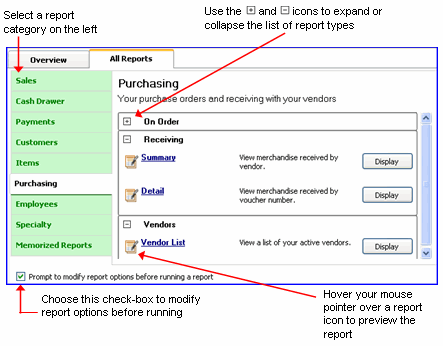
- Once you’ve located the report you need, click Display to run it.
- If you selected Prompt to modify report options.., the modify report wizard is displayed. Follow the on-screen prompts, selecting Help on each page for additional assistance.
- See work with a displayed report for options available once the report is displayed.
Report Categories
There are many report categories in Point of Sale. Each category includes various specific reports, offering several ways to analyze your accumulated data:
- Sales – View summarized or detailed sales information, such as best and worst selling items; sales by department, by vendor, by associate, or by store; discounts given; and sales taxes collected.
- Cash Drawer – Run X/Z-Out Reports, including register status, drawer count and closing reports, as well as a listing of cash drawer payouts.
- Payments – View summarized or detailed reports of sales payments by type.
- Customers – Print or export customer lists and analyze sales by demographics, customer type, or promotional codes. Pro users can also view summarized or detailed reports of merchandise on order, status of service jobs, and deposits taken on layaways, sales orders, and work orders.
- Items – Track inventory item, quantities, and costs, including merchandise on hand or on order, reorder points, and adjustments, and, in a multi-store configuration, transfers and inventory by store.
- Purchasing – View summarized or detailed listings of merchandise ordered and received, projected cash requirements, and vendor lists.
- Employees – View employee lists, sales performance, and tips collected. Pro users can also view hours worked, and commissions earned.
- Memorized Reports – View and access all reports you have created and memorized. This category does not display until you have memorized at least one report.
The information for each report is drawn from the related data sources (documents, inventory, customer records, etc). For example, most sales information is derived from receipts; purchasing information is drawn from purchase orders and receiving vouchers, and so on.