
It is important to price tag all your products to speed up your process, your flow and increase the efficiency of your store. QuickBooks Point of Sale can help you with its Price Tag Printer, so today we’re going to know where to buy it.
Here’s how:
- Go to blackrockbusiness.com/ . Don’t forget to visit and join our Facebook Group!
- Click on “Hardware”.

- On the “Hardware” page, select “Barcode/Label Printers”

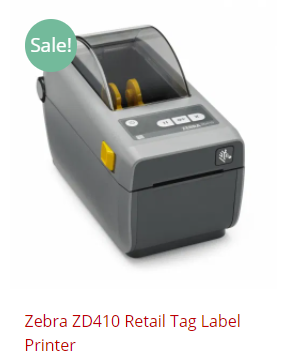
- Select the “Zebra ZD410 Retail Tag Label Printer”
- Add to cart then proceed to check out and start price tagging your items!