
Today we will learn about how to change your license number in point-of-sale without reinstalling the entire program. This is a little folder workaround and you don’t have to worry about your point-of-sale because you won’t be having a problem with it.
Note: before you make these steps make sure to close your Point-of-sale Window. So, the moment you finish the steps and open the point-of-sale window you won’t be having a problem.
Let’s begin:
- Open your “Folder”.
- Go to “Windows (C:)”

- On the C Drive double-click “Program Data”.
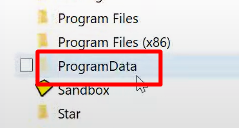
- If you don’t see the program data.
- Go to “View”.
- Then check “Hidden Items”.
- If you don’t see the program data.
- On the Program data folder double-click “Intuit”.

- In your Intuit folder find the version of point-of-sale you will use then double-click on it.
- From the version of point-of sale you selected double-click on “qbregistration.dat”.

- On the qbregistration.dat screen in notepad you can see the Installation Date, License Number, and the Product number.

- Erase the Old License number.
- Type in the New License number.
- Click “Save” on the “File” menu.
- Open the Point-of-sale window then, you can now start working with the new License number.