
 We are aware of an unexpected issue with QuickBooks Point of Sale (version 10 and above) which causes the Company Operations screen to loop continuously and prevents users from being able to log in. This is a result of Windows stopping the Intuit Entitlement Service. Our engineers are aware of this issue and are currently working on a resolution.
For the time being you can use the workaround below to access your data file, and you can also sign up for notifications regarding this issue by clicking here.
To access your data file:
- Close the QuickBooks Point of Sale program.
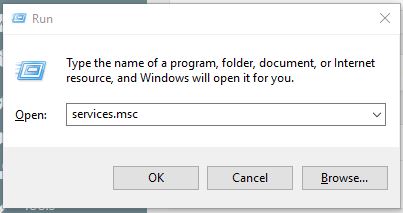
- Press the Windows + R keys to open the Run dialog box.
- Type in services.msc and select OK.
- For QuickBooks POS 2013 and QuickBooks POS 12.0: Select Intuit Entitlement Service v8
- For version 10.0: select Intuit Entitlement Service v6.0
- Right click on the appropriate version of the Intuit Entitlement Service and select Properties from the right click menu.

- On the Properties window, on the Startup type drop down menu select Automatic (Delayed Start).
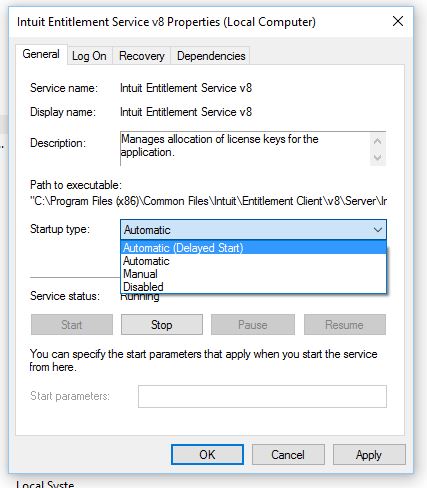
- Start the service, if it is not already, by clicking on the Start button.

- Click on the Ok button to close the properties window.
- Close the Services Window by clicking the X in the upper right corner.
- Reopen the Point of Sale program.