
To find out how to determine the balance of your customer’s Gift Card from Intuit Merchant Services, you would do the following:
Version 10.0 and newer:
To check the balance of a gift card from a sales receipt:
- Even if you are not making a sale, choose Point of Sale > New Sales Receipt.
- Choose I Want To > Check a Card Balance. The Gift Card Balance Inquiry window appears.
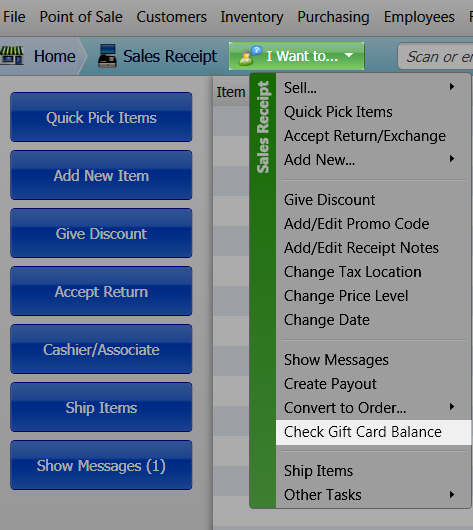
- Swipe or enter the card number and then click Check Balance. Point of Sale will connect to the service and display the card balance.

Note: To view the balances of all outstanding gift cards run the Gift Card Balance Summary report: Choose Reports > Payments > Gift Card > Balance Summary. This report is based on transactions recorded in Point of Sale. To verify the current balance of an individual card it is recommended you use the procedure above.
Versions 9 and earlier
To check the balance of a gift card from a sales receipt:
- Even if you are not making a sale, choose Point of Sale > New Sales Receipt.
- Click Take Payment.

- To the right of the Gift Card line, click Check a Card Balance. The Gift Card Balance Inquiry window appears.
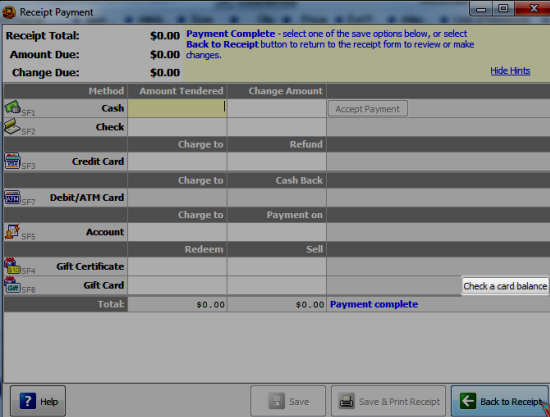
- Swipe or enter the card number, and then click Check Balance. Point of Sale connects to the service and displays the card balance.