Financial Center is an area in QuickBooks Point of Sale that has some specific settings or readouts for the interaction between QuickBooks Point of Sale and QuickBooks Accounting. So let’s start by opening the Financial Center.
- Click on “Financial” menu on the home screen of QuickBooks Point of Sale then select “Financial Center”.

- On the Financial Center we have the summary, the actions and the FAQs.

- Summary – This area shows the status and when was the last time QuickBooks Point of Sale was hooked up to QuickBooks Accounting.
- Frequently Asked Questions – These are list of questions that has been answered by QuickBooks Point of Sale, it may help you if you might happen to have the same question to ask.
- Actions – This area is where most of the Financial Center revolves around.

- Updated QuickBooks Desktop – When you want to update QuickBooks and push over all your financial data to QuickBooks Accounting automatically.
- Recent Activity – It views all the results of previous exchanges.
- Advanced Options – more options and settings for the Financial Center.
- So let’s proceed to the “Advanced Options” and quickly review all the settings.

- It’s the same as the Main Window of the Financial Center, so let’s dive in to the Actions area and discuss the functions of each.

- Connect to QuickBooks is where you can set up or modify your connection to QuickBooks. Switching to a new company file or when you are only about to set up your QuickBooks Point of Sale to your QuickBooks Accounting. Once you click on the button bellow the Action area. QuickBooks Point of Sale will let you choose either to reconnect the company file or choose a new one to connect to.

- Import Items is for importing data from your QuickBooks Accounting to your QuickBooks Point of Sale.
- Recover Data this is if you want to resend QuickBooks Point of Sale data over to QuickBooks Accounting. It is very useful in recovering data in your QuickBooks Accounting.
- Connect to QuickBooks is where you can set up or modify your connection to QuickBooks. Switching to a new company file or when you are only about to set up your QuickBooks Point of Sale to your QuickBooks Accounting. Once you click on the button bellow the Action area. QuickBooks Point of Sale will let you choose either to reconnect the company file or choose a new one to connect to.
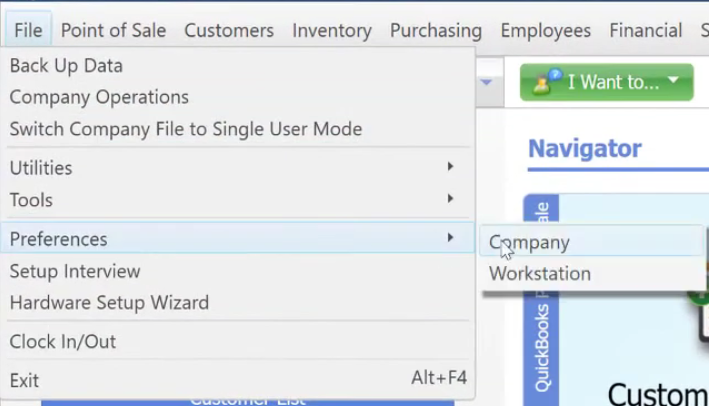
- Aside from the Financial Center, QuickBooks also have some finance settings under “File” menu then in “Preferences” click on “Company”. Select on the “Financial” section.