
Single User or Network Mode?
Within a store, Point of Sale can be run in Single User Mode (one workstation) or Multi User Mode (up to 20 networked workstations). In Multi User Mode, all the workstations have simultaneous access to the program. The most powerful computer should be the Server Workstation and holds the company data file with up to nineteen Client Workstations connecting to the server. A separate user license (or seat) must be purchased for each workstation requiring simultaneous access.
https://www.youtube.com/watch?v=8z_14F1JPpg
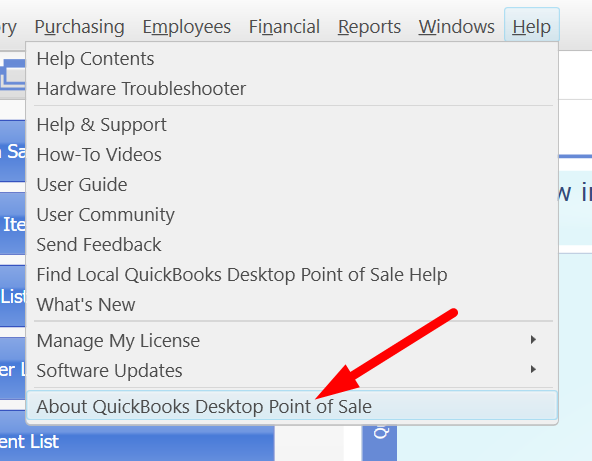
From the Home screen, you can view your current workstation type and number by selecting Help and About Point of Sale.
About the Server Workstation
Typically the first workstation to which you installed Point of Sale. If you are in Single User Mode, your workstation is a Server Workstation. Only the Server Workstation:
- Creates and holds your point-of-sale company data
- Can back up, restore, or rename the company data
- Exchange information with QuickBooks Desktop financial software
- Import data via the Data Import Tool
- Set item and customer ranking preferences
- (Pro) Exchange information with other stores
Only one Server Workstation can be installed on a network.
Important: The Server Workstation must be running for Client Workstations to have access to the Point of Sale data. (Point of Sale does not have to be open on the Server Workstation.)
Client Workstation
Any networked workstation that is not a Server Workstation is a Client Workstation. Client Workstations access the Point of Sale company data across the network.
Switching Between Single User and Network Mode
You initially choose Single User Mode or Multi User Mode when setting up your Point of Sale company file. When installing, it will ask you if you are using one computer or two or more computers. You may need to change this setting if you are adding or removing workstations in the future.
How to switch between modes:
- From the File menu, select Switch Company File to Multi User Mode or Switch Company File to Single User Mode.
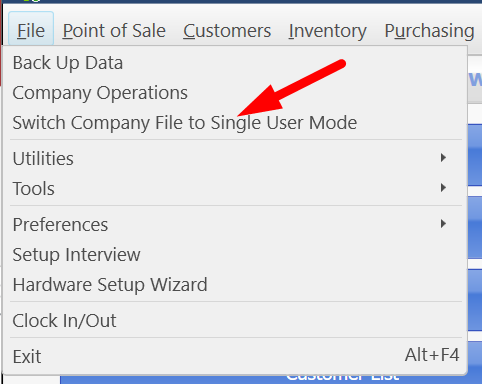
- Follow any on-screen instructions.
Note: Virtual Private Networks (VPN) and wireless networks tend to be low bandwidth (slow) and therefore are not recommended for use with Point of Sale. These network configurations may be unreliable.
What security permission does a user need to get this option
This is available on all versions of QuickBooks POS. You do need to have a user license for each computer accessing the POS simultaneously. So, if you want 3 POS stations, you will need a 3-user license. In that example, you would install POS as server on one computer, and install as client on the other two computers. If you need to purchase additional users for your current QuickBooks POS installation, give us a call or message!
If you are actually speaking of User Role security rights, I believe you would need to be Manager, Owner, or Sysadmin.