
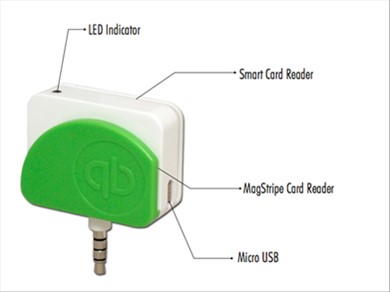
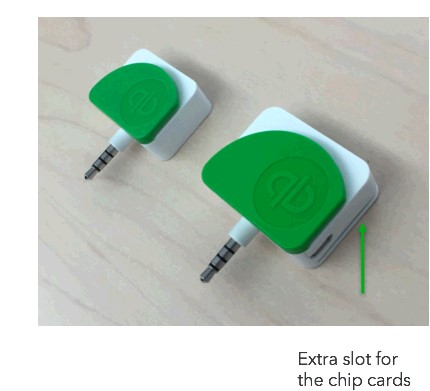
EMV Card Reader Device Parts
EMV Card Reader – Battery FAQ’s
- Why do I need to charge the reader? The old one did not need to be charged?
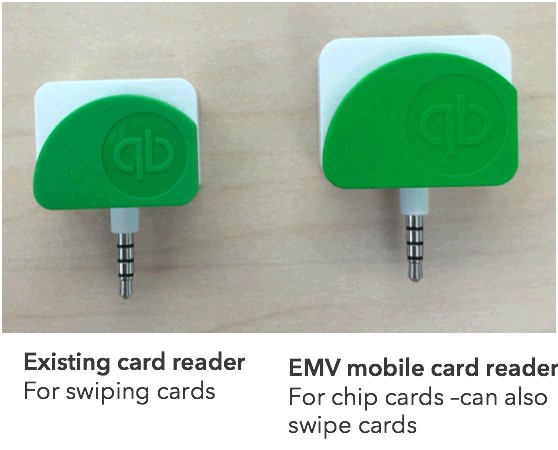
- The new EMV card reader processes transactions using EMV chip technology. Chip transactions require a higher level of energy than swiped transactions, therefore cannot be powered through the audio jack connector and needs an internal battery.
- How can I charge the card reader?
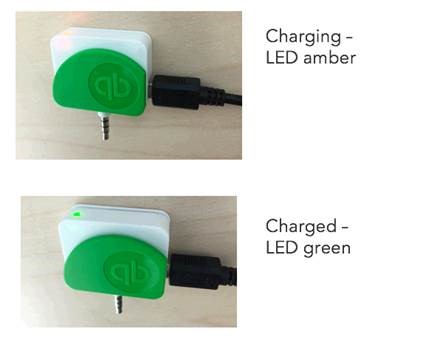
- You can use the USB cord provided in the box in which you received your reader. Other USB cables may work too. You should connect the micro USB port to the reader (on the side socket) and connect the USB port to a computer or electrical outlet (for this, you will need a USB to outlet adaptor). The LED will turn amber while the device is charging and green once it is fully charged.
- The EMV card reader will charge faster if connected to an outlet adaptor.
- How much time does it take for a complete charge?
- A complete chargetakes about 4 hours. Partial charges are possible too, but it will limit the number of transactions you can perform.
- Can I run transactions while I charge the card reader?
- Yes, as long as you connect your USB part of the cord to a non-data port( ex: connecting the device to a computer will prevent the reader from running transactions, but connecting it to an external battery or an eletrical outlet will allow it to work normally).
- How will I know i ran out of battery?
- We’ll let you know in GoPayment once your battery is below 10%. You will then need to charge the reader to keep processing transactions.
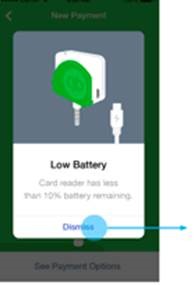
- We’ll let you know in GoPayment once your battery is below 10%. You will then need to charge the reader to keep processing transactions.
- Additionally, if you connect your card reader once it has run out of battery, we will remind you to charge it.
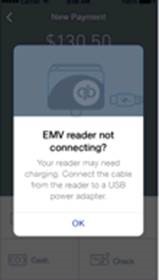
- If I run out of battery, can I still swipe?
- No, but you can use the non-EMV card reader for this, although you may be liable for the counterfeit risk? Please refer tohttp://quickbooks.intuit.com/payments/emv-reader for more information about swiping chip cards in a non-EMV device.
- How many transactions can I take on a full charge?
- The device should be able to take 150 chip transactions. However, this number may be lower depending on connectivity, card brands, error messages, etc.
Any further questions should be directed toward BlackRock Business Support: 1-888-282-8833