
The following are device and OS minimum requirements to effectively run Intuit GoPayment with the new EMV Chip Card Reader. Please follow these guidelines.
Intuit GoPayment Requirements
OS minimum requirements
- The mobile EMV card reader for Intuit GoPayment will be compatible with devices in the following versions:
- Apple OS minimum requirements: 8.0 or higher for iOS devices
- Android OS minimum requirements: 4.0 or higher for Android devices
App compatibility
- The mobile EMV card reader will be compatible with the following QuickBooks apps:
- GoPayment app, upon launch
- QuickBooks Online mobile app, at a later date
- NOTE: The mobile EMV card reader will NOT be compatible with QuickBooks Online Mobile app at launch
App version minimum requirements
- The mobile EMV card reader will be compatible with GoPayment iOS (Intuit GoPayment version 8.0 and higher) and Android (Intuit GoPayment version 5.0 and higher)
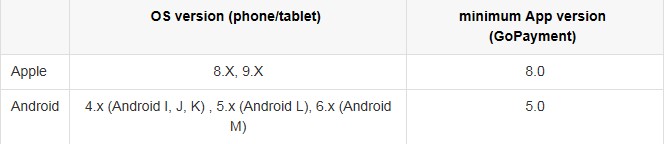
Intuit GoPayment Device compatibility
- iOS
- iPhone 4s, 5, 5c, 5s, 6, 6s, 6 Plus, 6S Plus, SE
- NOTE: The EMV card reader is not compatible with iPhone 4
- iPad 2, iPad (3rd generation), iPad 4th generation, iPad Air, iPad Air 2, iPad mini (1st generation), iPad mini 2, iPad mini 3, iPad mini 4, iPad Pro (12.9 inch), iPad Pro (9.7 inch)
- NOTE: The device needs to be running at least OS 8.0 to work with the EMV reader
- Android
- Phones
- Samsung Galaxy S5, S6, S6 Edge, S7, S7 Edge
- Samsung Note 3, 4, 5
- Tablets
- Samsung Galaxy Note 10.1
- Samsung Galaxy Tab 3 7.0
- Phones
If you have any further questions, feel free to ask BlackRock Business Support: 1-888-282-8833
Where can I order Intuit’s EMV-ready payments solutions?
EMV readers are available for Intuit GoPayment and QuickBooks POS Desktop 12.0.
We will inform you if and when other EMV products become available.
- Click here to purchase the mobile QuickBooks Payments EMV Card Reader for use with the GoPayment app.
- Click here to purchase EMV PIN Pad for QuickBooks POS.