
Back up Data at End of Day
The End of Day procedure includes an option to back up your data for QuickBooks POS.
Note: To include a data backup, the End of Day procedure must be run from the Server Workstation.
To back up data as part of QuickBooks POS End of Day procedure:
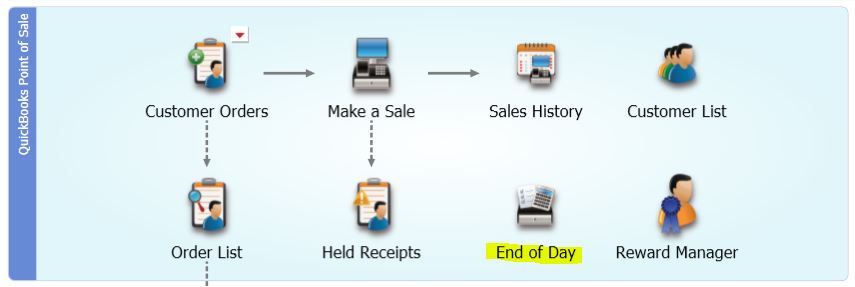
- From the QuickBooks POS home screen, select End of Day Procedure.
- Select the check box to Back up your company data and specify to the default location or to an alternate location.
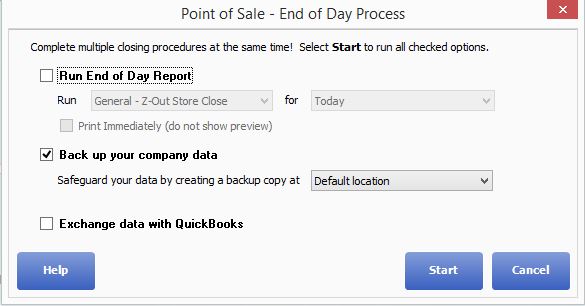
- If backing up QuickBooks POS to removable media, place blank formatted media in the appropriate drive.
- If using an alternate location, enter the path or browse to the alternate location and enter a file name.
- (Pro) Select the check box if you want to include inventory item pictures in the backup. Doing so may substantially increase backup time or file size.
- Specify other QuickBooks POS End of Day options, as needed.
- click OK.
Notes:
- If you have scheduled your backups, the next scheduled time is displayed On the End of Day window for reference.
- Point of Sale only backs up your QuickBooks POS data. Therefore, it should serve as only one component of a comprehensive data protection strategy. You must take separate action to back up other important information for your business (QuickBooks financial software records, payroll records, other applications, etc.).
- You should also consider a cloud based backup! Call us @ 888-282-8833 for more information and recommendations.