
Today we are going to talk about on how you can set your inventory items to taxable or non-taxable.
Let’s begin:
- On your Home screen go to “Item List”.
- On your Item list screen, you will see on the Tax Code column that most of your items are non-taxable.

There’s 2 ways on how to switch your inventory items to taxable and non-taxable.
1st way:
- Select an item, then click “Edit”.
- On the basic info section, look at the tax then choose “Non” or “Tax”.

- Then select “Save”.
2nd way:
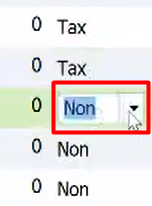
- If you have “Tax Code” column on your item list screen you can easily switch the item to taxable and non-taxable.
- Click on the tax code column the item you want to switch to taxable and non-taxable.
Note: always remember to look at your customers location if the item in their location is taxable or non-taxable.