
Today we will show you how to reverse a receiving voucher.
Let’s begin:
- From your QuickBooks point-of-sale screen click “Receiving History”

- On your Receiving History screen click on the voucher you will reverse.
- (You need to look at your system on what voucher went wrong that you want to reverse it.)

- (You need to look at your system on what voucher went wrong that you want to reverse it.)
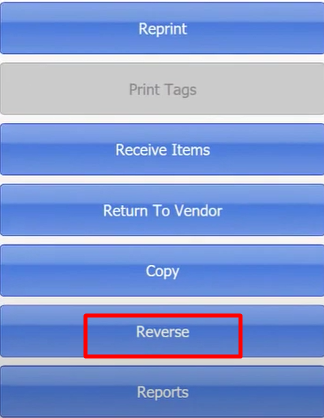
- Then on the left side of the screen click on “Reverse”.
- This will appear on your screen, click “OK”

- This will appear on your screen, click “OK”
- Then you’re done.
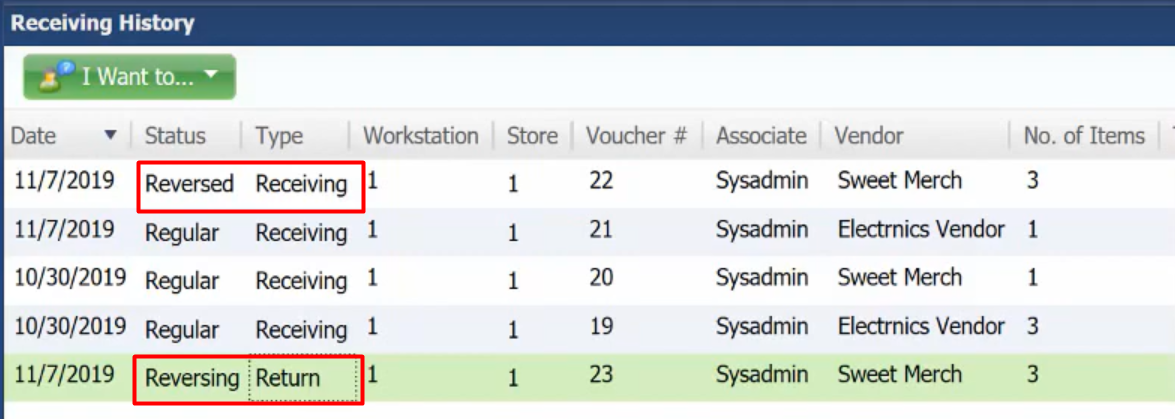
- Sweet Merch here is the example we use to reverse a receiving voucher.
- We have a new document of Sweet Merch that has Reverse and Return voucher, so in here you could already remove those products out of the inventory.
- You’re ready to start over again.