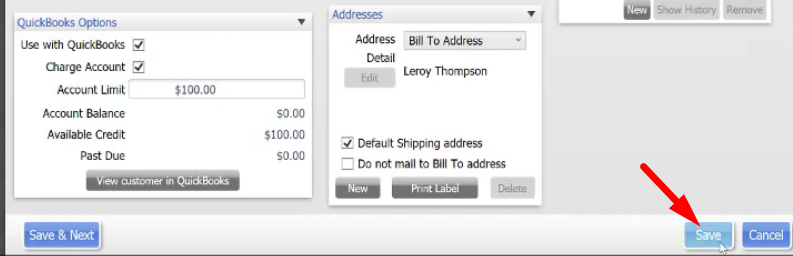
Customers account limit specifically pertains to customer house accounts or what you might call a tab and we are going to set them up a limit so the customers won’t spend over a certain amount on their customer house account.
Here’s how:
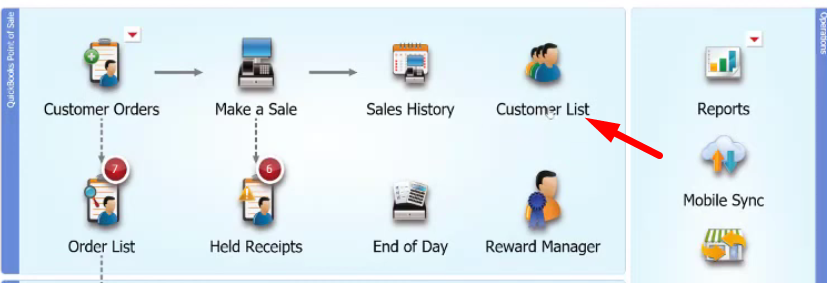
- To do this, you’re going to need a customer in mind. Click on the “Customer List” and select on the customer to whom you want to set an account limit on.
- Once you’ve highlighted the name of the customer, click on the “Edit” button.

- This will bring up the customer’s profile. On the bottom left, you have to turn on the usage of this customer with QuickBooks so tick on “Use with QuickBooks”.
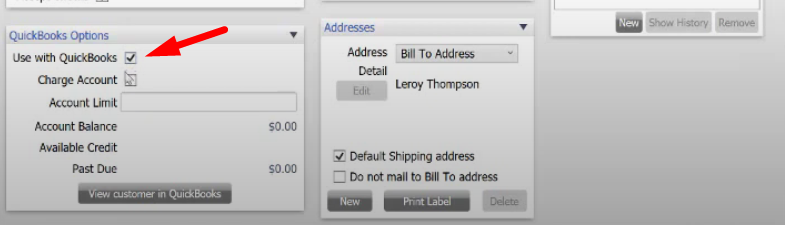
- Then tick on “Charge Account” and place the limit that you want to be charged on the customer’s account.

- If you are looking to investigate on how much somebody owes you, click on the “View customer in QuickBooks”. There you can check on their open invoices that have flown over from their charge.
- When you’re done placing the limit of your customer’s account, click on “Save”.