
Today we’re going to show you how you can actually do the ordering from your vendor by a box.
Let’s begin:
- On your Homepage go to “Purchase Orders”.
- On the upper left side of the screen, type here the Vendor name and Item name.
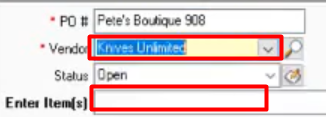
- This is your Unit of Measure tab on your purchase order. You can change the Unit of Measure to Box or Each.

- You can Add the quantity you want to order.
- Cost of every box is already here.
- Exit Cost is calculated if how many boxes you ordered multiply it to the Cost.